What you see on the bike
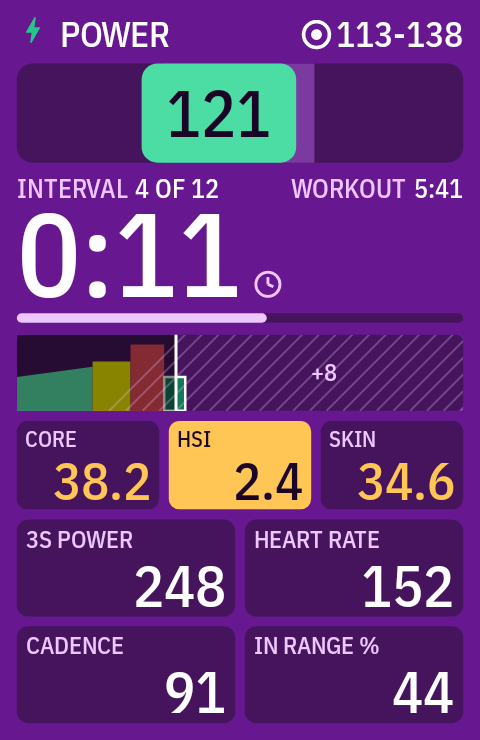
Every picture here is drawn by the extension's own code on each build, at the Karoo 2's 480 × 800 pixels, using the Karoo's own font.
Reading the target
The same colors as the Karoo 3. The box slides along the bar: the middle third is your target range. Single-value targets get the Karoo's own band, ±5 % for power and ±7.5 % for heart rate.
In range. Hold it there.
Below the range: push a little harder.
Above the range: ease off.
What's new
1.2.0 · Screen flash
The screen flashes with the beeps: an amber frame at 10 s and at 5-4-3-2-1, green as the next interval starts. On other ride pages the chip flashes instead. Turn it off with Flash the screen with the beeps.
1.1.0 · Beeps, recap and summary
Countdown beeps with a pulsing interval bar, an 8 s recap of each finished interval in the graph area, a per-interval table when the workout is done, and optional off-target beeps.
Set it up
You need a computer with adb and USB debugging turned on on the Karoo (Hammerhead's guide).
Download the APK
Get
karoo-workout-plus.apkfrom the latest release.Install it and let it draw over the ride app
adb install -r karoo-workout-plus.apk
adb shell appops set com.angkyria.karooworkout SYSTEM_ALERT_WINDOW allow
Or open Workout+ on the Karoo and tap Grant.
Ride a workout
Start a ride with a workout loaded. Workout+ covers the workout page by itself. To try it at your desk first, turn on demo mode in its settings.
Good to know
Your buttons stay yours
Workout+ never takes the hardware buttons. Page changes, lap and back work as always, and a swipe changes the page underneath.
Beeps you can count on
A double beep 10 s before an interval ends, then 5-4-3-2-1 and a long beep as the next one starts, and the screen flashes with each. Turn on off-target beeps to hear when you've been under or over the target for 15 s. All in the Alerts settings.
Choose your fields
Four slots: power, heart rate, cadence, lap and time data, core temperature and more. Set any of them to None to give the rest more room.
Power from your sensor
Your power, heart rate or cadence come from the Karoo's workout data, or straight from the sensor when the workout data has none.
CORE heat
With a CORE sensor, core temperature, heat strain and skin temperature show in the heat-zone colors. The heat strain comes from the CORE Heat extension.
Pause and skip stay on the Karoo
The extension API can't pause or skip a workout, so those stay on the Karoo's own controls. Workout+ shows the result, and PAUSED while the ride is paused.
Intervals as you ride them
The Karoo shares the running interval only, so the graph fills in as you ride. What's still to come is hatched.